

Codejock Xtreme Suite Pro ActiveX 15.2.1
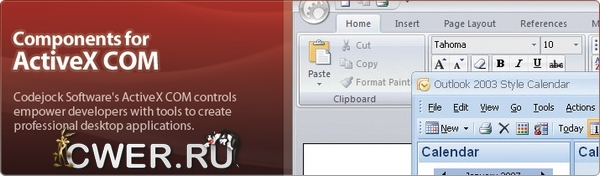
Codejock Xtreme Suite Pro объединяет 11 популярных Active-X COM компонентов: Xtreme Chart Pro, Xtreme CalendarPro, Xtreme CommandBars, Xtreme Controls, Xtreme DockingPane, Xtreme PropertyGrid, Xtreme ReportControl, Xtreme ShortcutBar, Xtreme Syntax Edit, Xtreme SkinFramework и Xtreme TaskPanel в один удобный пакет.
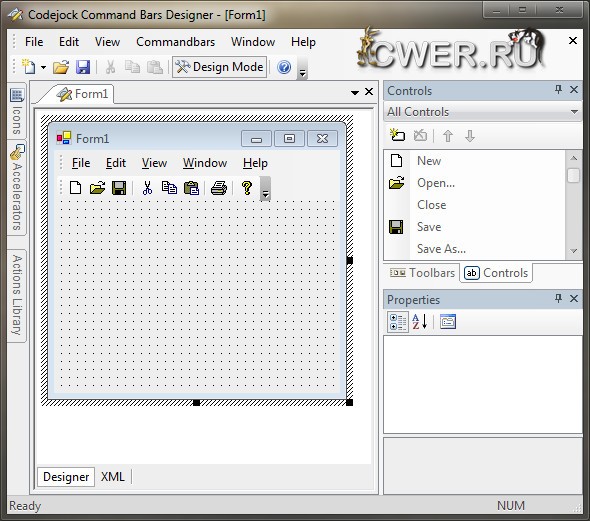
Количество всевозможных настроек и вариантов огромно - от различного расположения и расцветки элементов до динамической прозрачности и анимации окон.
Вниманию разработчиков предлагаются инновационные инструментальные панели Ribbon Bar и элементы управления Galley, которые появятся в следующем поколении продуктов от Microsoft.
Пользователи продукта также смогут по достоинству оценить улучшенную анимацию элементов управления, новые привлекательные стили оформления и поддержку формата изображений PNG.
- Xtreme CommandBars
Обеспечивает Windows разработчиков интерфейсом в стиле Office и One Note стилем MDI табуляции окна. Структура полностью поддерживает настройку меню и инструментальной панели, предоставляя больше контроля над рабочим приложением. - Xtreme CalendarPro
Календарь в стиле Outlook для Windows разработчиков. Разработчики смогут с легкостью создавать календари, которые могут управлять назначениями, быть упорядоченными по дням, неделям, рабочим неделям или месяцам. Данные в календаре могут быть привязаны к внешней базе данных, xml файлу или двоичному файлу. - Xtreme Controls
Предоставляет разработчикам программного обеспечения графического пользовательского интерфейса Windows многочисленные MFC компоненты, которые полностью спроектированы и протестированы. - Xtreme DockingPane
Обеспечивает Windows разработчиков стилем Visual Studio.NET закрепления окна. Windows разработчики смогут легко создавать позиции табуляции и автоматически скрывать окна, что позволит создать более управляемую рабочую область приложения. - Xtreme PropertyGrid
Обеспечивает Windows разработчиков свойствами грида в стиле Visual Studio.NET. Windows разработчики могут с легкостью создавать иерархический список доступных для редактирования свойств и представлять любой тип данных или подэлементов. - Xtreme ReportControl
Обеспечивает Windows разработчиков многофункциональным Outlook 2003 стилем отчетности. Windows разработчики могут с легкостью создавать группы и сортировать данные в иерархическом формате. В отчетности могут быть настроены все цвета, для соответствия существующему приложению. - Xtreme ShortcutBar
Обеспечивает Windows разработчиков ShortcutBar панелью навигации в стиле Office 2003, подобно навигационной панели в Microsoft Outlook 2003. - Xtreme SkinFramework
Обеспечивает Windows разработчиков высокотехнологичными приложениями, с "очищенной" технологией структуры, которая была разработана с помощью Windows Themes (визуальных стилей). - Xtreme SyntaxEdit
Обеспечивает пользователей эффективным компонентом для редактирования текста, который поддерживает расширенные особенности, такие как: текстовое блочное группирование, подсвечивание синтаксиса, номер строки, тип шрифта, цветовые схемы, книжные метки, точки разрыва и т.д. - Xtreme TaskPanel
Обеспечивает Windows разработчиков многофункциональной офисной панелью задач, наподобие Microsoft Office и Windows Explorer. Панель задач также может использоваться как Visual Studio .NET набор инструментов. - Xtreme ChartPro
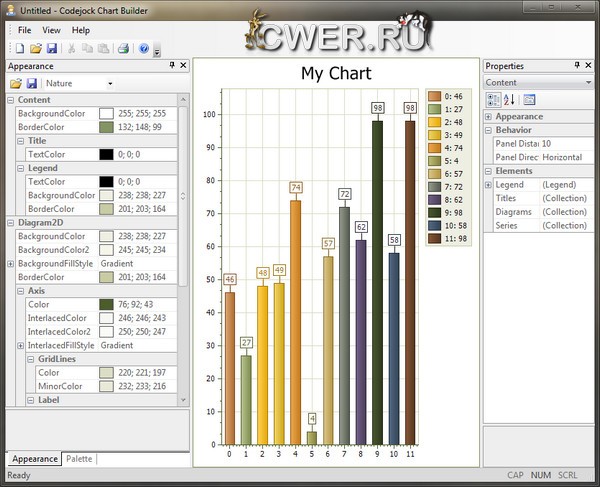
Библиотека диаграмм для разработки приложений. Применить диаграммы Chart Pro можно всего несколькими строчками кода, но, благодаря гибкости настроек, диаграммы удовлетворяют самым строгим требованиям разработчиков.
ОС: Windows 98, 2000, XP, 2003, 2008, Vista, 7 (32-64 бит)
- New feature: Enhanced CXTPResourceImages - added Map that stores all properties.
Xtreme Controls
- New feature: Added new TaskbarManager. Supports Overlay icon, Progress, Jump list
- Fixing source: Fix for issue #27257: Item.SubItem() has thrown error with skipped sub-items
- Fixing source: Minor fix for Markup + calculate height of dropDown list
- New feature: Added EnableMarqueeSelection
- Fixing source: Fix for issue #27169 (Treeview - HideSelection Property caused recreation of control)
- Fixing source: Fix for issue #27288 (HideColumnHeaders, HideSelection, LabelWrap, MultiSelect, RightToLeft, View used recreation of control, reset properties)
- New feature: Added new CXTPMarkupView for base View with markup
- New feature: Added new CXTPCoreTree for basic tree with labels, checkbox, markup and drag and drop. See new CustomizeTree sample
- Fixing source: With m_bMultiSelect now only report about LVIS_SELECTED and not about LVIS_FOCUSED
- New feature: Added "CancelLabelEdit" to TreeView control
Xtreme CommandBars
- New feature: Added AddPage method to allow add user pages to Customize Dialog
- Fixing source: Minor fix for PrintPreview
- New feature: Added CXTPTabClientWnd::Attach(CXTPCommandBars* pCommandBars, CMDIFrameWnd* pParentFrame) to allow any CMDIFrameWnd derived parent for CXTPTabClientWnd
- Fixing source: CXTPControlGalleryItems::Insertitem won't overwrite Caption if it was set before
Xtreme Ribbon Bar
- New feature: Added support of Visual Studio Ribbon editor. Added CXTPRibbonBuilder that convert XML file of Visual Studio to CXTPRibbonBar elements. See new RibbonResource sample
- Fixing source: Refactoring m_pFrameHook - removed from CXTPRibbonBar - now only CXTPCommandBars has it. Now application don't crush after user call EnableOffice2007FrameHandle and then switch theme
- New feature: Added new Customize Dialog for RibbonBar with Customize Ribbon page
- New feature: TrackingModeChanged notification added for Backstage to notify when it opened/closed
Xtreme Skin Framework
- Fixing source: Added "WorkerW" explorer window to exclude list. (#26817)
Xtreme Docking Pane
- New feature: New Visual Studio 2008 and Visual Studio 2010 Docking Stickers support added
- Fixing source: Fix for Issue #: 27260 "DockingPane Resizeing"
- Fixing source: Enhanced repaint while dragging floating panes
Xtreme Report Control
- Fixing source: Scrolling with arrow keys in virtual mode (screen rows are not in the rows collection)
- Fixing source: Draw grid / no items text for report with no columns
- Fixing source: Item click for virtual mode
- Fixing source: Fixed selected rows after CollapseAll was called and rows were still selected
- Fixing source: Fix crash in UpdateRecord if row is currently not visible (issue #25182)
- Fixing source: Fixed AllowAccess, setting was ignored in 15.1.x
- Fixing source: Fix printing of page footer (issue #27349)
- Fixing source: Fixing CXTPReportControl::SerializeState
- Fixing source: Fixed Outlook scheme
- Fixing source: Fixed Ctrl key behavior
- Fixing source: Fix selection / deselection with Ctrl key
- Fixing source: Fix selection with Shift key
- Fixing source: Fix for combobox with AllowEdit=FALSE
- Fixing source: Fix for Issue #27162 (HitTest Behavior): Version 13.2 and earlier returned xtpHitTestReportArea also for the empty report area. This has been broken in 13.3
- New feature: Added "CancelLabelEdit" to TreeView control is under Report
- Fixing source: Postpone EnsureVisible for zero size report control
- Fixing source: Fix for issue #27270 (opacity), #27308 (Drawing bug with alternate row color and hidden header)
- Fixing source: Fixed pop-up coordinates
- Fixing source: Fixed subitems selection (Issue #27296)
- New feature: Added HScroll and VScroll notification to ActiveX
- New feature: Added section index to scroll notification
- Fixing source: Removed m_bOnSizeRunning, m_bAdjustScrollBars (obsolete)
- Fixing source: Fixed SetFocusedRow(NULL)
- Important: Fixed spelling IsFilterable / SetFilterable
- New feature: Added CXTPReportColumn::m_bFixed property
- Fixing source: Fixed mouse scroll wheel,
- Fixing source: Fix for freeze columns
- New feature: Added column frozen property
- Fixing source: Fix for freeze columns
- Fixing source: Fix for creation as DDX_Control (MFC only)
Xtreme Calendar Pro
- New feature: Additional functionality for Issue #: 26671 "To use a different date/time for the calendar"
- New feature: Fix for Issue #27100 - AllDayEvent backgroud color - Added a flag which allows to disable\enable background fill for all day events
- New feature: Multi-month print option for print settings dialog
- Fixing source: Partial fix for drawing all day events area scroll icons above a multiday event
- New feature: Added "Today" override for calendar control (SetCurrentDate)
- Fixing source: Fixed selection rectangle width In the Office2010 theme of the calendar control in day/week view at the left side for multiple resource views
- Fixing source: Fixed double selection marks in month view when scrolling months
- Fixing source: Added ExpandButtonChecked property for calendar control built-in caption bar
- Fixing source: Fixed big tooltips positioning in the bottom of the screen: all tooltip will be visible now
- Fixing source: Fixed crash in calendar in case when both m_Multiplier and m_Constant in formula part of event are 0
- Fixing source: Fixed RTL appearance of timescale in calendar: now it shows hours and minutes like in LTR layout but the timescale itself is located in the right
- Fixing source: Partially fixed click on events for timescale when scroll bar is enabled: now the visible and logic ( hit test ) positions of the events should match each other
- New feature: Added an ability to change day\week\month caption bar date label text via XTP_NC_CALENDAR_GETITEMTEXT event ( for issue with week number in day view header)
- New feature: Added bHatchAllDayViewEventsBkgnd flag to enable\disable background fill for all day events in week\day views
- New feature: Added an ability to scroll all day events in day\week views in case when there are too many events an all day area
- New feature: Added feature to switch to week view when clicking week header in month view
- New feature: Added additional categories icons drawing on event for week\day views
- New feature: Added an ability to hide all day events area for day view and multicolumn week view
- New feature: Added an ability to scroll between resources in week\day views when EnableHScroll flag is set to false
- New feature: The MonthViewHideTimes property was added to calendar control. It will hide\show the times in month view
- Fixing source: Fix for Issue #26505 - Selection Rectangle of selected event too small on left side
Xtreme Chart Pro
- Important: Due to the various performance issues related to 3D charts we have decided to refactor the architecture for our charting project from the ground up. Because of this you will notice with this release the 3D charts have been removed as well as several changes made to the architecture and naming conventions. The 2D chart counterparts are still available and can be used in place of the 3D charts while we are refactoring the architecture. We apologize for any inconvenience that this may cause our customers and plan to release a much more robust and faster 3D charting project.
- New feature: New RangeArea, StepArea styles added
- New feature: Added Virtual Points feature
- New feature: Added AddPoints method optimized for Batch add big number of points, added EnableVirtualMode for ActiveX
- New feature: Added Label overlapping check for Pie chart types with Label.Position = TwoColumns
- New feature: Added option to keep the user from resizing the nodes in a FlowGraph
- Fixing source: PI renamed to m_dPI to prevent conflicts with user defines
Скачать программу Codejock Xtreme Suite Pro ActiveX 15.2.1 (110,36 МБ):


